 MY BOWLING JOURNEY
With sharing on, your league night is on Live as you bowl, at your league's bowling center. Turn it on from the question Set up asks the first time you start a night at a bowling center, or on My Live. The question is under The Live question on Starting a session.
What goes on the board
- Each frame, once you enter it on the pin deck.
- A game you type as a total, as its score. A typed score wins over the frames.
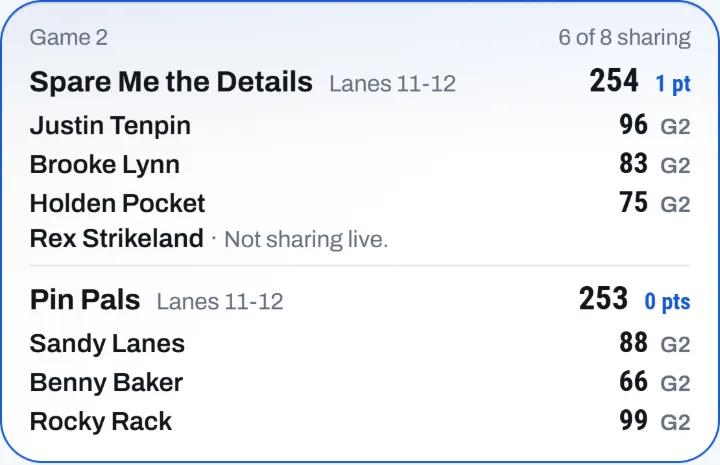
- Your team's pins in each game, and your points once your team marks Points Won on Results.
- After the night, its games stay on Live's History for 30 days.
Your notes, balls and stats aren't shared.
The night shows at the bowling center set on your league. With no center set, it isn't on any board. See Bowling centers.
Who sees it
- Anyone in the app who picks your league's bowling center on Live.
- Anyone with the center's live link, in a browser, with no sign-in. See Getting your league on Live.
- Your teammates see your name in the app. Everyone else sees the name you chose under How others see you, unless Show my name on Live is on. On the live link, your teammates see that short name too.
- Bowlers in your league can follow you and get alerts as you bowl: when you start, a strike streak, a big game, a perfect game going. To set the big game, the follow screen shows them your league average.
Your team on the board
- In the app, your team's card lists your whole team for you and your teammates. A teammate who isn't sharing shows Not sharing live.
- Other teams, and the live link, see only the bowlers who share. The rest are a count.
- A teammate you score on your phone shows only if they share too. Someone you score who doesn't have the app shows as initials, except to your team.
- On two teams in the league? Your frames show under the team you're bowling for tonight. The other team's card says you're bowling for that team.
Turning it off
On My Live, tap On beside Share my scores live. See My Live.