 MY BOWLING JOURNEY
Tap any match card or lane on Scores and it opens frame by frame: each bowler's scorecard for the game, filling in as they bowl. A frame shows once the bowler enters it.
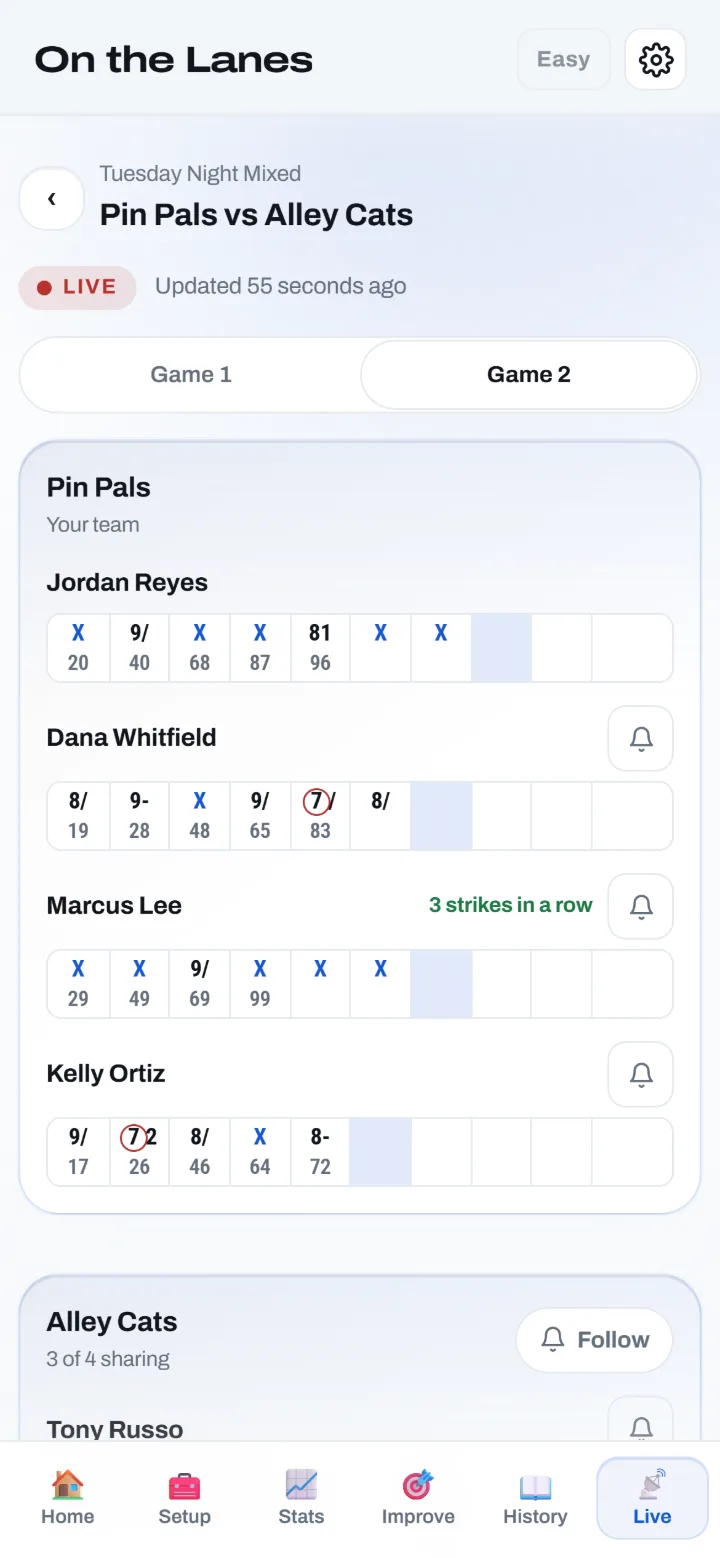
Open a match
- On Scores, with By league picked, tap a match card. Anywhere on the card opens it, a bowler's row too.
- The top shows the league and the two teams.
- Once more than one game has been bowled, tabs like Game 1 and Game 2 switch between games. It opens on the game being bowled.
- Tap ‹ to go back to Scores.
A team's card
Each team in the match has its own card:
- The team's name, with Your team under yours. Under the other team, how many are sharing, like "3 of 4 sharing". Then the lanes it's on in that game.
- Each bowler's ten frames: the marks on top, the running total under them. The shaded box is the frame being bowled now.
- A split's first ball is circled, as on the scoring sheet. On a 9-pin no-tap night, a no-tap strike's X is in its own color.
- A game typed as a total, not frame by frame, shows as "Game score entered: 212".
- Beside a name: "3 strikes in a row" while a streak of three or more is going, Perfect game going once a game's first six or more balls are all strikes, and "Finished: 212" when the game's done.
- No frames yet in that game: "No frames in game 2 yet."
Bowlers who aren't sharing
Your own team's card lists your whole team. A teammate who isn't sharing shows Not sharing live. Other teams list only the bowlers who share, then count the rest, like "2 more on this team not sharing live." A team where nobody shares says "Nobody on this team is sharing live."
On two teams in the league? A bowler bowling for their other team tonight shows on this one as "Bowling for" that team's name, and their frames are with the team they're bowling for.
Bells and the ⋯ button
- In your own leagues, there's a bell beside each bowler who's sharing, and Follow beside the other team's name. See Following teams and bowlers.
- The ⋯ beside a bowler, a team or the league is for blocking or reporting. See Blocking and reporting a bowler.
Open a lane
- On Scores, with By lanes picked, tap a lane.
- The top shows the center and the lane, like "Lane 14" or "Lanes 11-12".
- Every bowler on it is listed with their frames, the same as in a match. Under each name: their team and league, or Practice, Open bowling or the tournament, and their lanes.
- The game tabs and ‹ work the same way.
A bowler in your league who isn't on a team yet opens the same way from their own row under the matches on By league, with a bell to follow them.