 MY BOWLING JOURNEY
On a league night with no league set up, the app asks you to Add your league first. If you'd rather just bowl, tap Skip for now. The night is saved as a league night with no league yet, and you link it to your league or team later.
Where to link
- Home: while any night is waiting, a card says "You have a night with no league yet. Link it to your league or team." (or how many nights). Tap Link.
- History: Link to a league sits under the night on Sessions, and under it on the day in Calendar.
- After you add a league: right after you add or join one, the app offers the nights with that league picked.

Link them
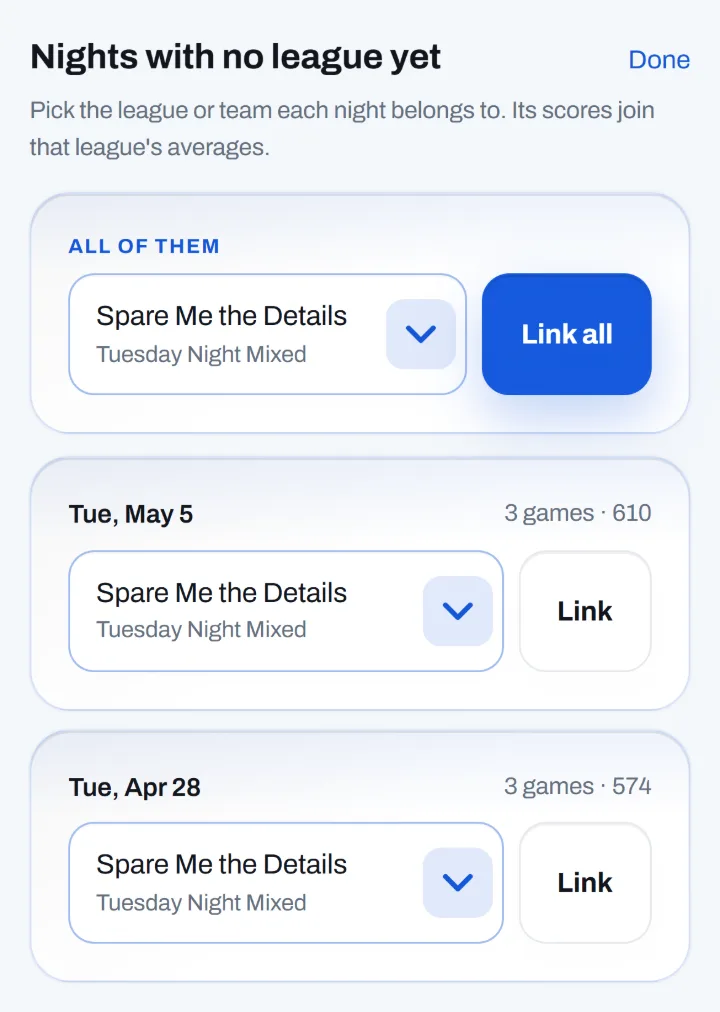
- The Nights with no league yet screen lists each night with its date, and its games and total, like "3 games · 612".
- In the box under a night, pick the league or team it belongs to. A team shows with its league under its name, like "Spare Me the Details" over "Tuesday Night Mixed"; in the list it reads "Spare Me the Details (Tuesday Night Mixed)".
- Tap Link beside it.
- Two or more nights? All of them at the top links every one to the same place with Link all.
- Tap Done when you're finished. Once they're all linked, it says Every night is linked to a league.
No league yet? The screen says "Add your league, then link these nights to it." Tap Add your league to go to Setup > League. See Adding your first league, team and bowlers.
What moves
Everything from that night goes to the league you pick, for everyone you scored on it: the frames, the game scores, the ball and surface for each typed game, the points and the lane conditions. Its scores then count in that league's averages. Picking a team puts the night under that team.
If the league already has a night on that date, the linked night is kept as a second night that day, so nothing is overwritten.