 MY BOWLING JOURNEY
Sessions is the first tab of History. It lists every night you've saved, newest first: league nights, practices, tournament days and open bowling. Tap History in the bar at the bottom to get there.
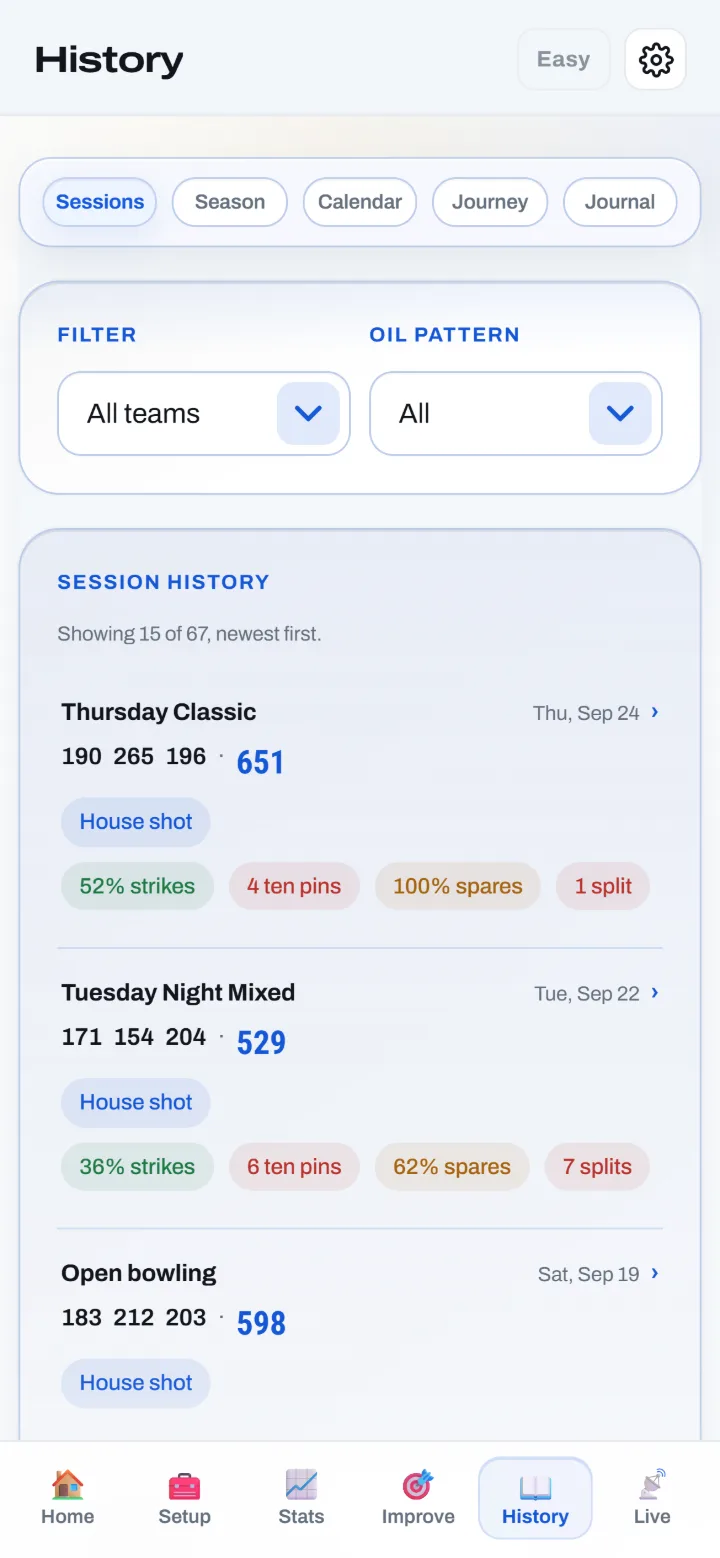
What each row shows
- The league's name (Practice, Open bowling or the tournament's name for those), and the date.
- Each game's score, then the night's total in blue.
- The night's oil pattern, with its length when the app knows it, like "2026 PBA Viper · 37 ft". A night with no pattern set says House shot. A pair that ran two patterns shows both.
- On a night you scored frame by frame: your strike percentage, how many ten pins you left (seven pins for a left-hander), your spare percentage and how many splits. A night of typed game scores has none of these.
- A No-tap tag on a 9-pin no-tap night, and a Baker tag on a Baker tournament day.
- A doubles or team tournament day also shows the team's total, like "1,616 team".
- A night that isn't finished says In progress if it's today, or No finished game yet. if it's older.
- A prebowl shows under the night it counts for, with the day you bowled it, like "Prebowled Tue, Nov 17".
The line at the top says how many you're seeing, like "Showing 15 of 67, newest first." Fifteen show at a time. Tap "Load 15 More" at the bottom for the next ones.
Nights you scored for teammates aren't in this list. It's your own history.
Filter
Filter picks which nights the list shows:
- All teams: every night.
- One of your leagues, named by your team in it when you have one: only that league's nights.
- Tournament: only tournament days. It's there once you've bowled one.
Practice and open bowling are in the list too, once you've bowled them. The Filter shows once there's more than one of these to pick from. What you pick here also sets the card on the Season tab.
Oil pattern
Oil pattern shows only the nights bowled on one pattern. All shows every night. It offers each pattern you've bowled, the one with the most nights first, and House shot for nights with none set.
With a pattern picked, three numbers sit above the list: how many nights, and your average and high series on that pattern. The average and high series come from league nights and tournament days only, never practice, open bowling, a night you bowled as a sub or a Baker day. 10-pin and 9-pin no-tap are never added together. If your nights on a pattern this season are all 9-pin no-tap, the numbers are the no-tap ones, with the No-tap tag.
See all nights on a pattern in My patterns opens this list with that pattern picked. See My patterns.
Open a night
Tap a row to open it. A league night, a practice and a tournament day open on their Results. An open bowling night opens a Results screen of its own. See Opening a past night.
A night with no league yet has Link to a league under it. See Linking nights with no league yet.