 MY BOWLING JOURNEY
Calendar shows your bowling a month at a time, so the weeks you bowled and the weeks you missed are easy to see. It has everything: league nights, practices, tournaments and open bowling.
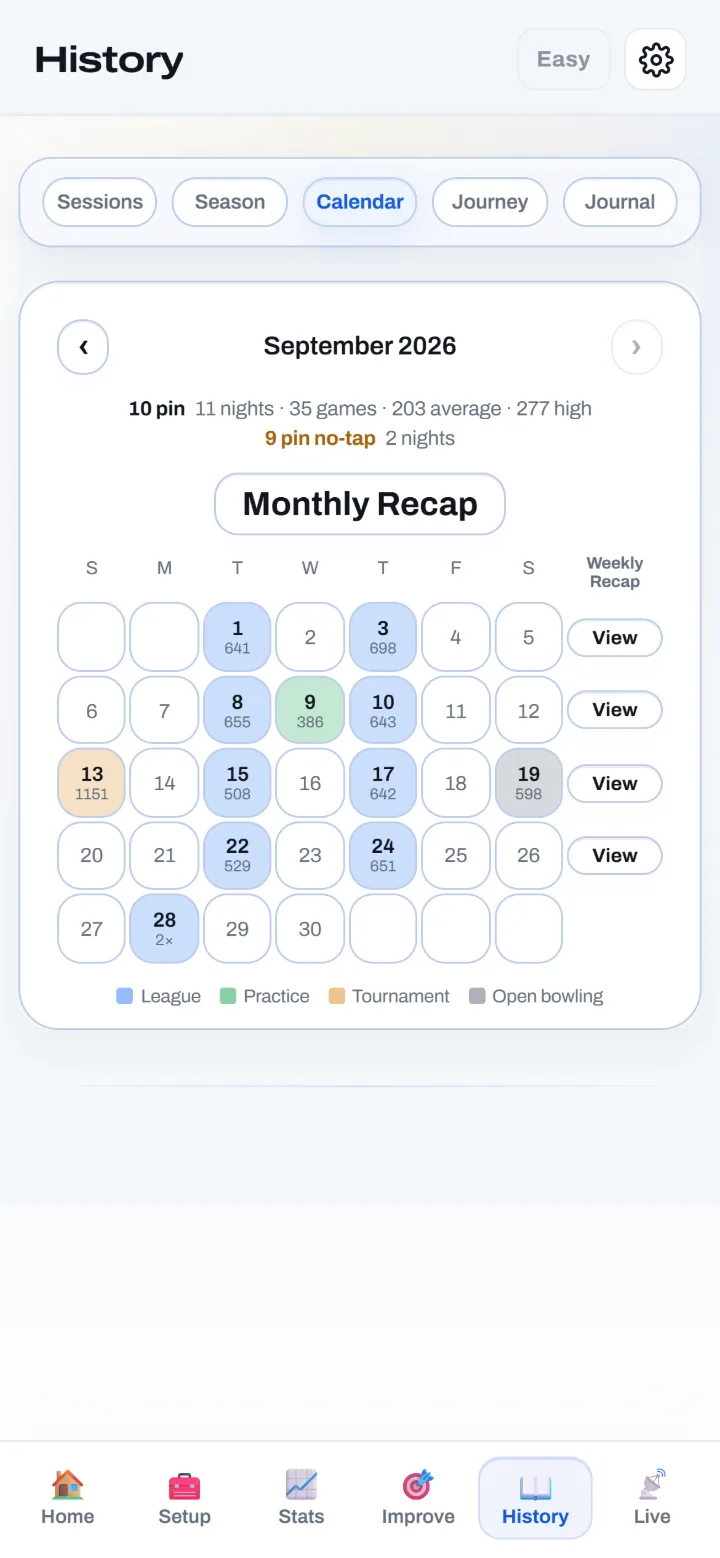
The month
- It opens on your latest month. ‹ and › at the top step back and forward, skipping months you didn't bowl.
- Weeks start on Sunday.
- A day you bowled is filled in the color of what you bowled, with the night's series under the date. Two kinds of night on one day split the square in two. Two or more nights show how many, like "2×".
- The key under the month names the colors you can see, when there's more than one.
- A 9-pin no-tap night's series is in the same color as the 9 pin no-tap label.
The line under the month adds it up, like "11 nights · 35 games · 203 average · 277 high". It counts every kind of night that month. 10-pin and 9-pin no-tap are never added together: a month with no-tap nights has a line for each, marked 10 pin and 9 pin no-tap. A practice of only drills or accuracy counts as a night with no games.
A day
Tap a filled day. Its nights open under the month. Tap the day again to close them.
- League, practice and open bowling: the games, then the series, average and high game, like "651 series · 217 average · 265 high". A frame by frame night adds its strikes, spares and splits.
- A practice: its drills and accuracy too, like "Drills: 18 of 25 made (72%)".
- A tournament day: how it finished and how far you got, then QUALIFYING with your games, total, average, high game and how far over or under the cut you were, then MATCH PLAY and STEPLADDER when you bowled them that day. A tournament of separate events lists each event's total and finish, with All events on its last day.
- What you wrote: the night's Session Notes, then your shot notes.
- A night that isn't finished says No finished game yet.
Tap the night to open it. See Opening a past night.
Under a night you'll also find Link to a league for a night with no league yet, and Delete this night. See Linking nights with no league yet and Deleting a whole night.
Weekly and Monthly Recaps
- Monthly Recap, under the month's line, opens the recap for that month.
- The Weekly Recap column at the right has a View button on the row of each recap week that's over and had bowling in it.
Back from a recap brings you to the same month. See The Weekly Recap.