 MY BOWLING JOURNEY
Practice opens on Plan. The Practice Plan card lays a practice out in blocks, in order: drills, Accuracy and games, each with the minutes it takes. Setting up the practice itself (the date, center, lane and Lane Conditions) is on Setting up a practice.
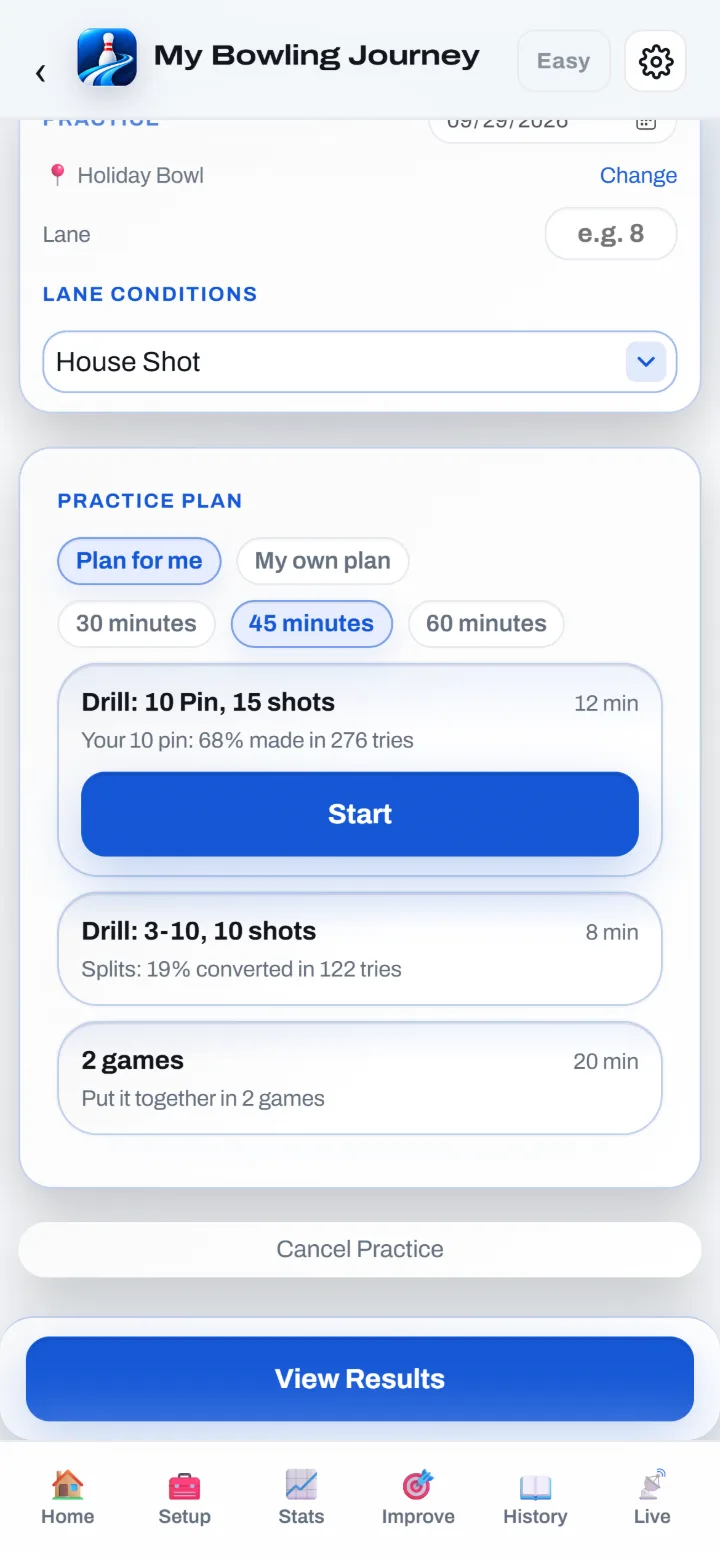
Plan for me
- On Home, tap Practice. It opens on Plan, with Plan for me picked.
- Pick 30 minutes, 45 minutes or 60 minutes.
- Read the blocks. Each says what it is, like "Drill: 10 Pin, 15 shots", how many minutes it takes, and why it's there.
- Tap Start on the first block.
What goes in it
Until you've logged 5 nights, the card says "This plan gets personal after 5 logged nights." and gives you a starter plan: the 10 pin ("The 10 pin, the spare bowlers leave most"), Accuracy at the arrows ("Hitting your mark at the arrows"), and in 45 and 60 minutes, games. A left-hander gets the 7 pin.
After that the plan comes from your league and tournament frames, never practice or open bowling, in this order:
- Your goals first. A 10 Pin Spare % goal puts the 10 pin at the top ("Your goal: 90% on the 10 pin"). A Strike % goal adds a pocket drill ("Your goal: 25% strikes"). See Goals.
- Your weakest single-pin spare, like "Your 10 pin: 68% made in 276 tries".
- Accuracy at the arrows, at the board you aimed at there in your last Accuracy set, when that set missed there by a board or more on average: "Your last Accuracy set was 1.4 boards off at the arrows".
- The split you leave most, when you're making very few of your splits: "Splits: 19% converted in 122 tries".
- Games to finish: "Put it together in 2 games". A 45 or 60 minute plan always ends with at least one.
If nothing stands out, you get the 10 pin. Once you've worked a drill block, it leaves the plan until you bowl another league or tournament night, and comes back then only if that spare still needs the work.
The minutes come from about 45 seconds a shot and 10 minutes a game. A plan never runs past the length you picked.
My own plan
- Tap My own plan.
- Add blocks in the order you want them: + Drill, + Accuracy and + Games. A plan holds up to 8.
- Set each block:
- A drill: pick the spare, the combination or Strike Ball (pocket hits) from its list, then the Shots with − and +.
- Accuracy: pick where you're aiming (Dots, Arrows, Near range finders or Far range finders), then the Board and the Shots.
- Games: how many, 1 to 6.
- ↑ moves a block up one. ✕ takes it out. The total shows under the blocks, like "Total: 40 minutes".
- Tap Start.
A custom drill with pins you pick yourself isn't in the list here. Set it up on the Drill tab instead. See Practice drills.
Your favorite
- Tap Save as favorite to keep the plan for any practice. "Saved as your favorite." shows under the buttons, and a Favorite chip joins Plan for me and My own plan.
- The Favorite chip shows the blocks and the total, with Start, Edit (a copy into My own plan to change) and Remove favorite.
- Clear plan empties My own plan.
A new practice opens on Plan for me with My own plan empty. Your favorite stays.
Running the plan
- Start opens the first block on its own tab: Drill with the spare already picked, Accuracy with the target already set, or Games.
- A bar under the tabs shows where you are, like "Plan: block 1 of 3, 10 Pin, 4 of 15 shots".
- When a block's count is reached, the next one opens on its own after a moment.
- Next block moves on early. On the last block it's Finish plan. Leave plan stops the plan; what you've bowled stays.
- Go back to Plan while it's running and you'll see the blocks with the one you're on in bold, Continue and Leave plan.
The plan is kept on this phone.
After the plan
Tap View Results. A Plan card shows each block planned against done, like "10 Pin: 15 of 15 shots, 73% made", and "Planned 45 minutes, bowled 52". Then tap Save and end practice, which also ends a plan still running. Cancel Practice throws the plan away with the rest of the practice.
More on the practice's Results: Practice Recap and Drill Recap.