 MY BOWLING JOURNEY
Heading to the pro shop for a new ball? The Pro Shop Card puts what your driller asks on one page. It's part of Pro.
Open it
- On Setup > Balls (or Bags), tap the Arsenal Map row. It's there once you have two balls or more.
- Tap the Pro Shop Card tab.
What's on it
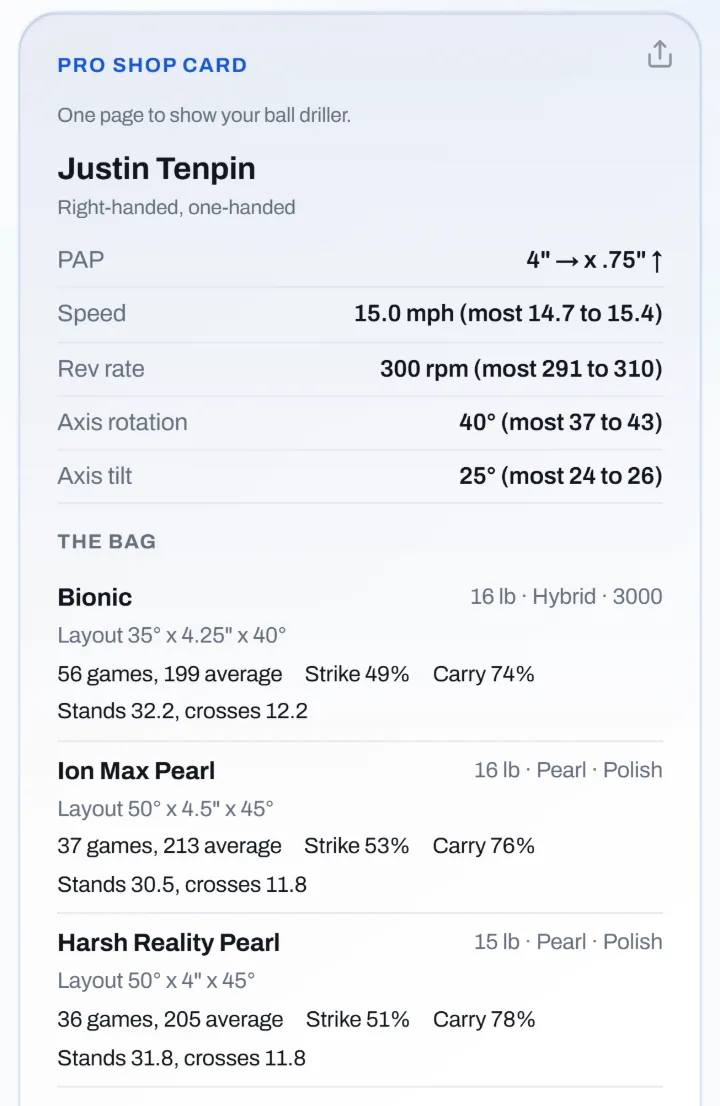
You. Your name, your hand and whether you're one- or two-handed (and a backup ball, if you throw one). Then:
- PAP, from your bowler card in Settings > Profile. Not entered yet? It says Add it in Profile. See Your profile.
- Speed, Rev rate, Axis rotation and Axis tilt, each your typical number with your usual range, once you've entered them on 20 first balls or more. See Delivery DNA.
The bag. Every ball you throw (not archived ones), most games first, with its weight, cover and surface, and its layout. Then, where there's enough to say: games and average, strike %, carry %, and the board you stand on and the arrow you cross with it.
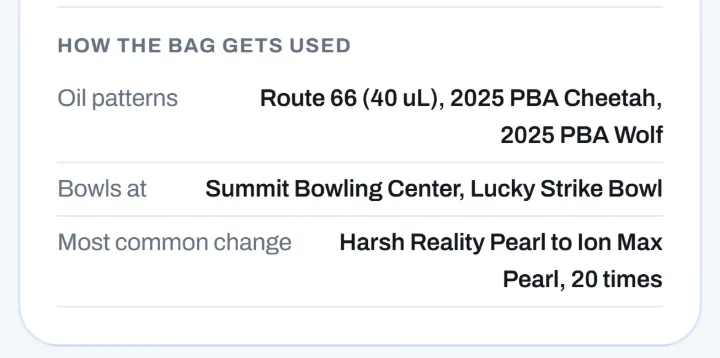
How the bag gets used. The named oil patterns you bowl most (the house shot isn't listed), the centers you bowl at most, and the ball change you make most often, like "Phaze II to Ion Max Pearl, 4 times".
The Caddie's gaps. After you've asked the Caddie, its gaps go at the bottom. See The Caddie.
The card fills in from what you've entered: specs and layouts on Setup > Balls, your lines and delivery in the details after a ball, and your league's center and pattern.
Share it
Tap the share button at the top right of the card. It goes as a picture, through your phone's share options, so you can text or email it to your driller.
On the free plan
The tab says what the card holds, with See what Pro adds.