 MY BOWLING JOURNEY
Match play is the head-to-head part after the cut: one opponent a game, and bonus pins for each win. It's a stage when you pick Match play under Then what? on Set up, and it opens as Match in the row of stages.
Before you start
On Set up, the Match play row's Edit has:
- Games: how many matches you bowl. The stage is done when that many are in.
- Bonus per win and Bonus per tie: 30 and 15 to start. Events pay different amounts, so set them to what this one pays. They're on the stage too.
- Pins carry over: on when your qualifying pins start your match play total.
Entering a match
- On the Match Play card, set Date bowled.
- Tap + Add Match.
- Type the Opponent's Name and the lane. In a handicap event, type their handicap in Opp hcp. In doubles or a team event, that's their team's handicap a game.
- Type your score under You and theirs under Them. In doubles or a team event, a match is your team's total against theirs: the box reads Team.
The match then says win, loss or tie, and by how many pins. In a handicap event it's decided on the handicap totals: your game plus your handicap against theirs plus theirs. In doubles or a team event, your team's handicap is everyone's added up: yours plus your partner's, or each teammate's, as you typed them on Set up. A tie stays a tie and earns the tie bonus.
Remove takes a match off; the ones after it move up a number.
Frame by frame: tap Track frames on a match to point the scorecard at its game, starting at frame 1. Your score fills in when the game is finished. If you type a different one, a red "≠" with the frames' score shows beside it; tap it to use the frames. In doubles or a team event your frames are only your own game, so type the team's total yourself.
Your record
Once a match is in, a card under them shows:
- Record: wins and losses, like 5-3, with ties as a third number, like 5-2-1.
- Total with bonus: your match play pins with handicap and bonus pins, plus your qualifying pins when they carry over.
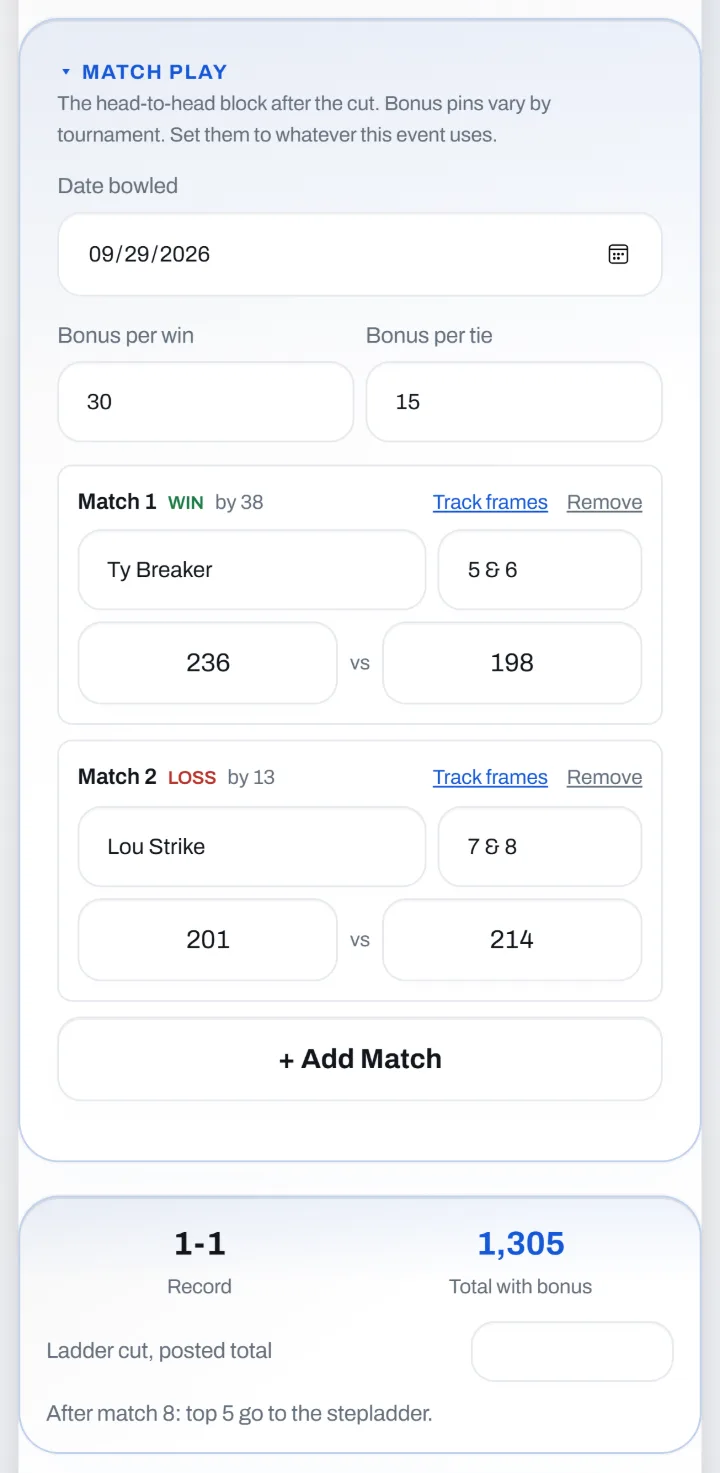
When the matches are done, "Next: Stepladder" (or whatever comes next) opens the next stage.
The ladder cut
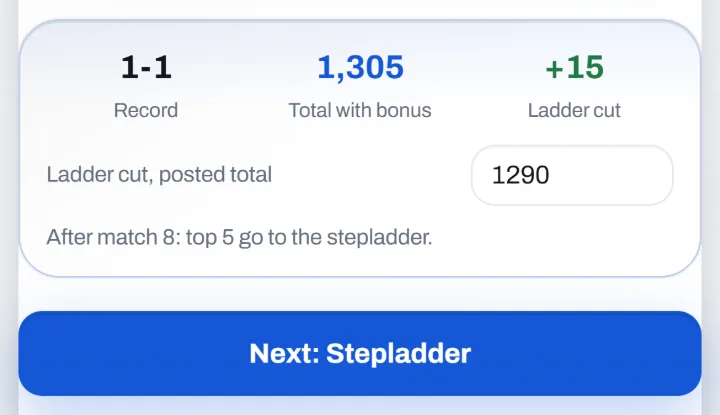
When a stepladder comes after match play, the same card asks for the ladder cut.
- Type the cut in Ladder cut, posted total. It's the total on the sheet, not pins over 200.
- Ladder cut shows how far above (green) or below (red) your total with bonus is.
- A line says how it works, like "After match 8: top 5 go to the stepladder."
- Tap the button under it: "Next: Stepladder" when you're on or above the line, or Next: Results when you're below it.
The whole block, match by match, with your best and worst and how close they were, is on Results. See The tournament recap.